Drony Configuration(Android) For Iitg

Edit 17/08 UPDATE - Use Psiphon instead.. it is a better alternative to Drony for internet behind proxy. A guide to the same can be found here.

Configuring Drony for IITG WIFI: (For Android Only)


1. Configure the IITG WiFi network using the following Settings-

EAP method- PEAP
Phase 2 Authentication- GTC
CA certificate- (unspecified)
Identity- (Your webmail User id)
Password- (Your webmail password)
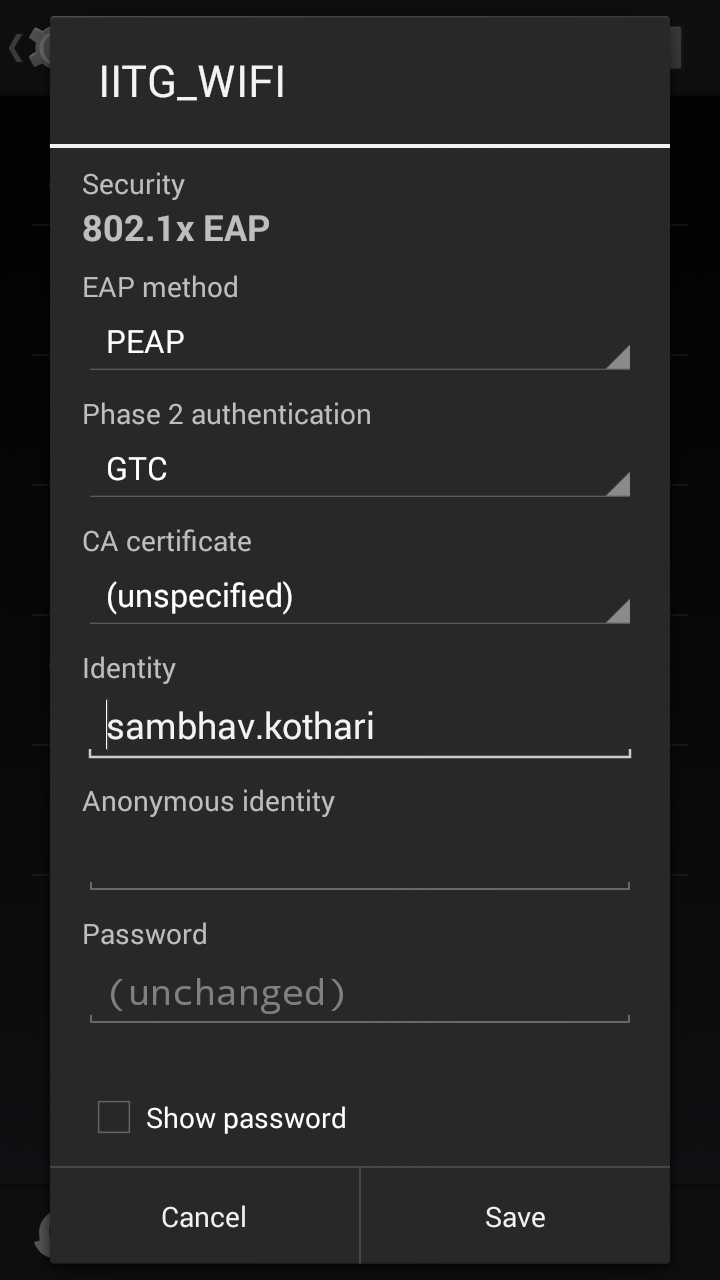


2. Click on 'Show advanced options'

3. Select 'Manual' for Proxy

4. Enter 'localhost' as proxy hostname and 8020 as proxy port.

5. Leave IP settings to DHCP.


6. Install Drony from the Play Store.

7. Go to the Settings tab for Drony.

8. Set the port to 8020.
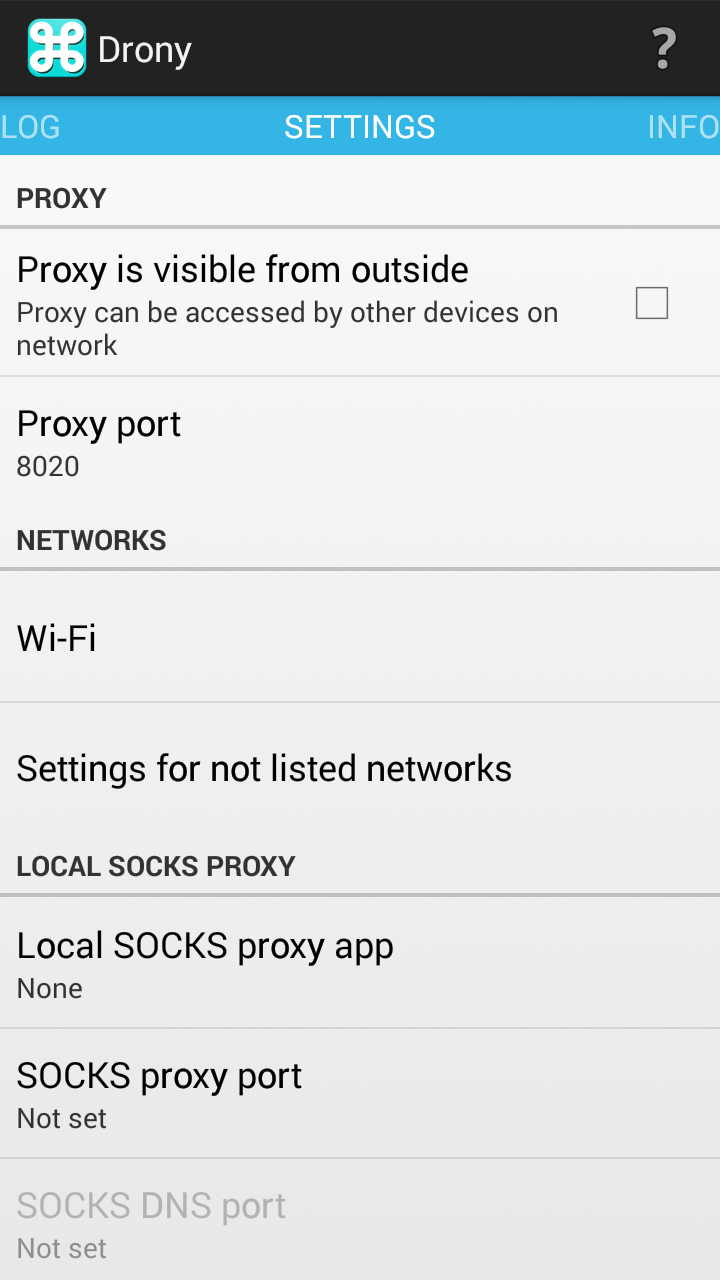


 9. Go to Wi-Fi.

10. Select the option that says 'IITG_WIFI'

11. You will reach the screen as shown below.

12. Select Proxy Type as Manual.

13. Change Host name to the proxy server provided to you by the CC. It will be something along the lines of 202.141.XX.XX.

14. Change the port to 3128.

15. Change the Username and Password to your web-mail id and proxy password.


16. Go back to the main screen and start Drony by clicking 'ON'.


17. Congrats, you have now successfully configured Drony and can now use all your apps on the IITG WiFi network.

If you have some questions, leave a comment below.


Psiphon Settings For Proxy


I have been searching for a good drony alternative for Lollipop for quite some time now.

Psiphon seems to be the best yet.

You can download it from here.

1. Go to your Wi-Fi settings and change the Proxy settings to None.

2. Open Psiphon and go to option and select the settings as given below. Go to More Options and configure it as follows.


3. In the More Options screen , configure Psiphon as shown below.
Replace 202.141.80.22 with the server address you use for your proxy authentication.
Port will be 3128.Username and PWD will the proxy username and passwords you use normally.


4. Start Psiphon and let it run. I found almost everything to be working (Chrome , Play store, whatsapp , Messenger, Facebook).
This is the best alternative to Drony I have found yet. If you know of something more seamless let me know.


Drony Configuration(Android) For Iitg

Edit 17/08 UPDATE - Use Psiphon instead.. it is a better alternative to Drony for internet behind proxy. A guide to the same can be found here.

Configuring Drony for IITG WIFI: (For Android Only)


1. Configure the IITG WiFi network using the following Settings-

EAP method- PEAP
Phase 2 Authentication- GTC
CA certificate- (unspecified)
Identity- (Your webmail User id)
Password- (Your webmail password)


2. Click on 'Show advanced options'

3. Select 'Manual' for Proxy

4. Enter 'localhost' as proxy hostname and 8020 as proxy port.

5. Leave IP settings to DHCP.


6. Install Drony from the Play Store.

7. Go to the Settings tab for Drony.

8. Set the port to 8020.


 9. Go to Wi-Fi.

10. Select the option that says 'IITG_WIFI'

11. You will reach the screen as shown below.

12. Select Proxy Type as Manual.

13. Change Host name to the proxy server provided to you by the CC. It will be something along the lines of 202.141.XX.XX.

14. Change the port to 3128.

15. Change the Username and Password to your web-mail id and proxy password.


16. Go back to the main screen and start Drony by clicking 'ON'.


17. Congrats, you have now successfully configured Drony and can now use all your apps on the IITG WiFi network.

If you have some questions, leave a comment below.


Psiphon Settings For Proxy


I have been searching for a good drony alternative for Lollipop for quite some time now.

Psiphon seems to be the best yet.

You can download it from here.

1. Go to your Wi-Fi settings and change the Proxy settings to None.

2. Open Psiphon and go to option and select the settings as given below. Go to More Options and configure it as follows.


3. In the More Options screen , configure Psiphon as shown below.
Replace 202.141.80.22 with the server address you use for your proxy authentication.
Port will be 3128.Username and PWD will the proxy username and passwords you use normally.


4. Start Psiphon and let it run. I found almost everything to be working (Chrome , Play store, whatsapp , Messenger, Facebook).
This is the best alternative to Drony I have found yet. If you know of something more seamless let me know.


Search

Blog Archive