How To Hack Wep/Wpa/Wpa2 Wi-Fi Password


If you are living nearby someones WiFi hotspot and every time your laptop search for conne How to Hack WEP/WPA/WPA2 Wi-Fi Password


If you are living nearby someones WiFi hotspot and every time your laptop search for connection its showing up but you don't have passwords. Or you just want to steal someones WPA/WPA2 Wi-Fi hotspot key or passwords. Don't worry...

In this tutorial I’ll show How to hack a WPA/WPA2 Wi-Ficonnection through a bootable USB.

Things you should need:
1. A USB pen drive.


2. beini.iso file. [Download it from HERE].

3. UNetbootin software to make your USB drive bootable. [Download for Windows, Linux or Mac]

Some few steps you should to do ( WEP):

1. Write beini.iso on your USB by UNetbootin. Set everything according to this image bellow.

If you are living nearby someones WiFi hotspot and every time your laptop search for conne How to Hack WEP/WPA/WPA2 Wi-Fi Password

2. After finishing restart your PC and boot it from your USB.

3. If you were successful to boot up then you should see something like this. Click Minidwep-gtk.
If you are living nearby someones WiFi hotspot and every time your laptop search for conne How to Hack WEP/WPA/WPA2 Wi-Fi Password

4. Click OK.

If you are living nearby someones WiFi hotspot and every time your laptop search for conne How to Hack WEP/WPA/WPA2 Wi-Fi Password

5. Now Minipwep-gtk  program will open. Click Scan.
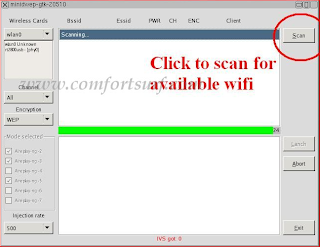
If you are living nearby someones WiFi hotspot and every time your laptop search for conne How to Hack WEP/WPA/WPA2 Wi-Fi Password

6. Select a wireless network(should have Clint) from the list. And click Lunch to start creaking process.
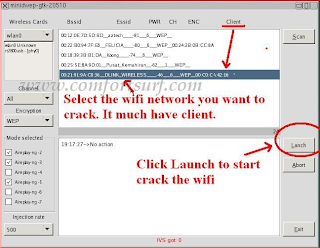
If you are living nearby someones WiFi hotspot and every time your laptop search for conne How to Hack WEP/WPA/WPA2 Wi-Fi Password

7. Sometimes its take a while according to your victim connections IVS value and password strength. So keep passions.

If you are living nearby someones WiFi hotspot and every time your laptop search for conne How to Hack WEP/WPA/WPA2 Wi-Fi Password

8. If it found a password, it should appear like this.
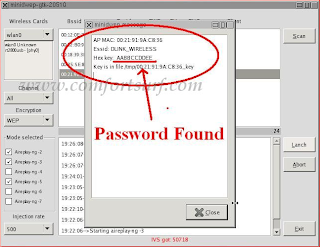
If you are living nearby someones WiFi hotspot and every time your laptop search for conne How to Hack WEP/WPA/WPA2 Wi-Fi Password


To creak WPA/WPA2 follow this image instruction.

If you are living nearby someones WiFi hotspot and every time your laptop search for conne How to Hack WEP/WPA/WPA2 Wi-Fi Password

Let me know if you have done it successfully or you have any complicity.

      Click here for Unetbootin.rar (4.91 Mb)

Click Here Download beini.iso - (49.61Mb)

How To Check Who Else Connected On My Wi-Fi Network


So I'll come to the point, mostly we are using wireless internet connection to access web via above mentioned devices. If you are using a wireless internet connection, you will set a password protection on your wireless network due to security reason.


 everyone have started to use hybrid technology products like touch screen laptops HOW TO CHECK WHO ELSE CONNECTED ON MY WI-FI NETWORK
Like technology is improving, hacker and cracker are also increasing every day. So there are possibilities of anyone accessing internet through your wireless network but this is not identical.
Don't worry, here I have a solution to identify who are the people connected to your wireless network.

Wireless Network Watcher is introduced to identify who have connected on your wireless network. Wireless Network Watcher is a utility that scans the wireless network and shows a list of all PC and devices connected to your wireless network.


 everyone have started to use hybrid technology products like touch screen laptops HOW TO CHECK WHO ELSE CONNECTED ON MY WI-FI NETWORK

This free tool provides you the following information on your wireless network.
IP Address
MAC Address
The company that manufactured the network card
Optionally the computer name

Click Here to Download Wireless Network Watcher Version 1.57

Four Best Wifi Cracking Applications For Your Iphone


1. Aircrack-ng for IPhone:
It is the simple command line with graphical interface software which is used to crack wifi networks . It sends packets to the wifi network and then cracks the password file of the network .It is used widely and can be downloaded from here


2. IWep Lite:
It is an Iphone applications which let you crack wifi network in less than 30 minutes . It is easy in use and can be understood easily rather than Aircrack-ng . It is Graphical interface with best utility and dictionary . Apart from Aircrac-ng it uses dictionary and so it is less trustworthy than Aircrack and can not crack every key. It is used more widely than Aircrack but it uses dictionary that's why it is on 2nd number. It can be downloaded from here


3. WepGen:
WepGen is just another application which cracks the Wifi network by sending packets and it is rather easy in use than Aircrack but though it is on 3rd number due to it's popularity.
 It can be downloaded from here


4. IWifi Hack:
It works on the same scene as other cracking softwares except iweplite means it sends packets and break in the security of a wifi network . It is easy in use and can easily be used by anyone. It can be download from here

Wifi Hacking Software Aircrack-Ng Updated After 3 Years

Heloo eveyone today i found a good wifi hacking tool as u know about it AirCrack! an update has beed made to it!
The Best WiFi hacking suite "AirCrack-NG" updated 1.2 Beta 1 after three years from the last release. 
 
Aircrack-ng is a set of tools for auditing wireless networks.
New version added a few new tools and scripts (including distributed cracking tool).Aircrack-ng is an 802.11 WEP and WPA-PSK keys cracking jadwal that can recover keys once enough data packets have been captured.
diCompilation fixes on all supported OSes.
Makefile improvement and fixes.
A lot of fixes and improvements on all tools and documentation.
Fixed licensing issues.
Fixed endianness and QoS issues.
Download AirCrack-NG for Linux? and For Windows?

Drony Configuration(Android) For Iitg

Edit 17/08 UPDATE - Use Psiphon instead.. it is a better alternative to Drony for internet behind proxy. A guide to the same can be found here.

Configuring Drony for IITG WIFI: (For Android Only)


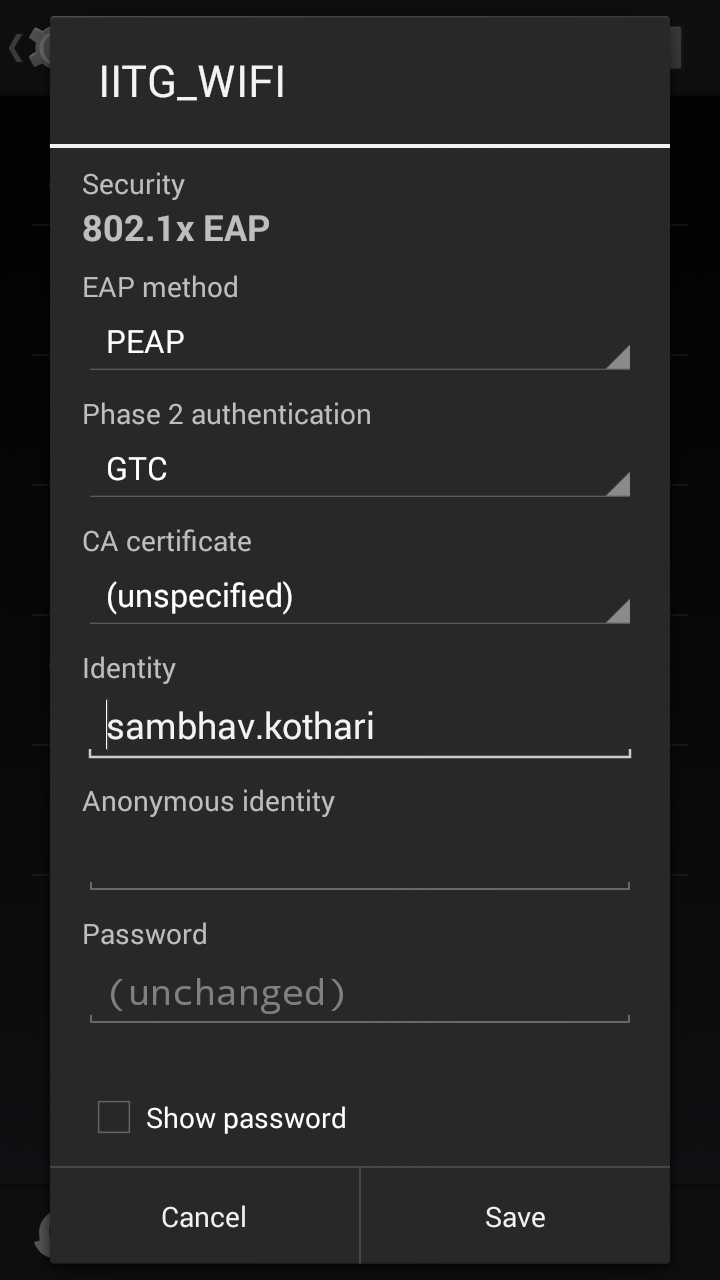
1. Configure the IITG WiFi network using the following Settings-

EAP method- PEAP
Phase 2 Authentication- GTC
CA certificate- (unspecified)
Identity- (Your webmail User id)
Password- (Your webmail password)


2. Click on 'Show advanced options'

3. Select 'Manual' for Proxy

4. Enter 'localhost' as proxy hostname and 8020 as proxy port.

5. Leave IP settings to DHCP.


6. Install Drony from the Play Store.

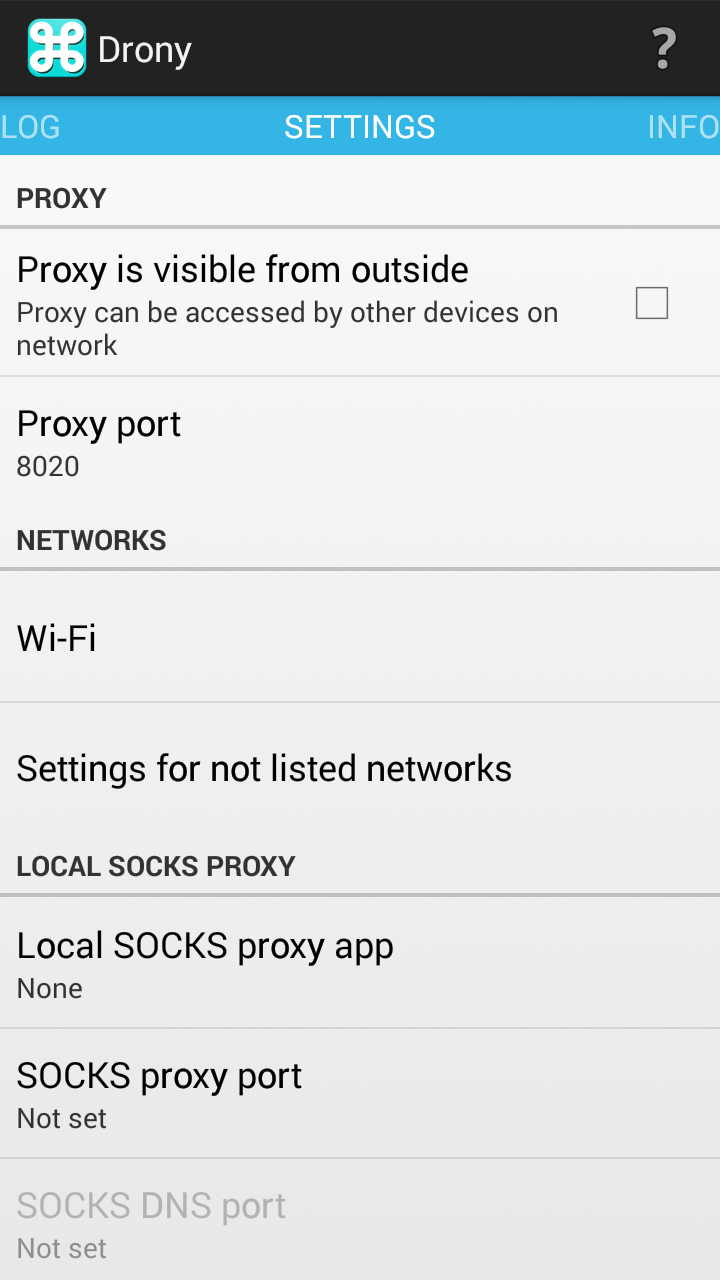
7. Go to the Settings tab for Drony.

8. Set the port to 8020.


 9. Go to Wi-Fi.

10. Select the option that says 'IITG_WIFI'

11. You will reach the screen as shown below.

12. Select Proxy Type as Manual.

13. Change Host name to the proxy server provided to you by the CC. It will be something along the lines of 202.141.XX.XX.

14. Change the port to 3128.

15. Change the Username and Password to your web-mail id and proxy password.


16. Go back to the main screen and start Drony by clicking 'ON'.


17. Congrats, you have now successfully configured Drony and can now use all your apps on the IITG WiFi network.

If you have some questions, leave a comment below.


Drony Configuration(Android) For Iitg

Edit 17/08 UPDATE - Use Psiphon instead.. it is a better alternative to Drony for internet behind proxy. A guide to the same can be found here.

Configuring Drony for IITG WIFI: (For Android Only)


1. Configure the IITG WiFi network using the following Settings-

EAP method- PEAP
Phase 2 Authentication- GTC
CA certificate- (unspecified)
Identity- (Your webmail User id)
Password- (Your webmail password)


2. Click on 'Show advanced options'

3. Select 'Manual' for Proxy

4. Enter 'localhost' as proxy hostname and 8020 as proxy port.

5. Leave IP settings to DHCP.


6. Install Drony from the Play Store.

7. Go to the Settings tab for Drony.

8. Set the port to 8020.


 9. Go to Wi-Fi.

10. Select the option that says 'IITG_WIFI'

11. You will reach the screen as shown below.

12. Select Proxy Type as Manual.

13. Change Host name to the proxy server provided to you by the CC. It will be something along the lines of 202.141.XX.XX.

14. Change the port to 3128.

15. Change the Username and Password to your web-mail id and proxy password.


16. Go back to the main screen and start Drony by clicking 'ON'.


17. Congrats, you have now successfully configured Drony and can now use all your apps on the IITG WiFi network.

If you have some questions, leave a comment below.


Search

Blog Archive