What Is So Special About ‘Truecaller’ Application


Truecaller is basically a phone directory to search for unknown caller name by entering their phone number or name. It’s available in almost all Mobile Operating system such as Android, iOS, Blackberry OS and Windows Phone. Application allows your phone book to connect with Facebook and Linkedin.

Features of Truecaller

* Search for Mobile Numbers and Landline Numbers
* Call Blocker and Caller ID is provided
* Connect to Facebook and LinkedIn

Requirement of Truecaller

*Android 2.1 and up
*3G and WiFi Connection

How Treucaller Works?

Truecaller helps in identifying Spam calls and calls from annoying Customer care, Bank Loan Offers and Other useless calls on which you don’t want to waste your time. Now for the serious part, It helps girls from identifying those Unknown pesky numbers and Missed calls.
Please See → “Girls, You will be enjoying this and as for Boys, here comes your real Villain” from your Admin.
Other Users Opinions About TrueCaller :
Overall the review for “truecaller” android application is Good. It got a 4.5+ rating in Google Play which is really good. There are certain Privacy issues against True caller such as access to names and phone numbers in your phone book.
According to True caller “ our users on the Android platform downloaded from Google Play will until further notice NOT be able to contribute to the True caller directory, but will nevertheless experience the same level of service as if they had. In other words, we will NOT collect any information from your phone book. “
If your so much worried about your Privacy, please do not enable “Enhanced Search” because it will access names and numbers from your phone book and those details will be saved in Truecaller’s database.
For people concerned about “Privacy”, you can unlist your number by going to this link
unlist ( I have already unlisted my number  Truecaller is basically a phone directory to search for unknown caller name by entering t What Is So Special About ‘Truecaller’ Application ) and for people who like to change their name, please follow this link

Available in → On All Android Mobile smartphones and Tablets
Tested on → Galaxy SIII
Rating on Google Play→ 4.5
Last Update → January 21, 2013
Current Version → 2.992

Intercepter Ng-Aio Sniffing Tool For Android


Traffic Sniffing is a process where the attacker trips to find out the packets of the loca InterCepter Ng-Aio Sniffing tool for android
Author of the app: Intercepter NG
Traffic Sniffing is a process where the attacker trips to find out the packets of the local lan network in wifi/wifi hotspot.It is usually has essential information.It also used to poison the traffic maybe divert to wrong location (INTENDED FOR education purposes).Now this tool is perfect handy for person who really like sniff like a dog.

REQUIREMENTS:

1.A Android Smartphone/Tablet with Android version of 2.1+.
2.INTERCEPTER NG SCRIPT: Link
3.Knowledge about sniffing/poisoning 

FEATURES:

Sniffing password (ICQ/IRC/AIM/FTP/IMAP/POP3/SMTP/LDAP/BNC/SOCKS/HTTP/WWW/NNTP/CVS/TELNET/MRA/DC++/VNC/MYSQL/ORACLE/NTLM)
ARP SCANNING/GATEWAY/SMART SCANNING
CAPTURING PACKETS AND POST-CAPTURE
REMOTE TRAFFIC CAPTURE
NAT/SOCKS/DHCP
ARP/DNS OVER ICMP/DHCP/SSL/SSL STRIP/WPAD/SMBRELAY MITM/DNS SPOOFING

SAMPLE TESTING:

Traffic Sniffing is a process where the attacker trips to find out the packets of the loca InterCepter Ng-Aio Sniffing tool for android
 ARP POISONER :
Traffic Sniffing is a process where the attacker trips to find out the packets of the loca InterCepter Ng-Aio Sniffing tool for androidA sample testing of LAN network is on.
SAMPLE LOGS:  Demo

 WIRESHARK BASED CAPTURE:

Traffic Sniffing is a process where the attacker trips to find out the packets of the loca InterCepter Ng-Aio Sniffing tool for android

A similar wireshark technology on your hand.Easy capture as you go anywhere coffeshop,airports,bus terminals,malls etc.
Traffic Sniffing is a process where the attacker trips to find out the packets of the loca InterCepter Ng-Aio Sniffing tool for android

COOKIE CHECKER:

Traffic Sniffing is a process where the attacker trips to find out the packets of the loca InterCepter Ng-Aio Sniffing tool for android
In the setting you could sniff for SSL/SSL STRIP etc all the other options mentioned above . All credits goes to the Author of the APP.

Installing Back|Track 5 On Smartphones/Tablets


Requirements:

1.Back | track 5 Arm architecture which can be downloaded from the official website of the Back | track Here.
2.A smartphone/tablet which needs to be rooted since it requires root permission to run certain scripts. (micromax a110 as example)
3.Following Android Apps:
BUSYBOX : It acts like a installer and uninstaller.it needs root permission to run.it has gpu cores and can  run linux kernals on android . Link  
Superuser: This app just grants a superuser power to your phone just like “su” does for linux. Link
Terminal Emulator is app that runs a terminal console in android .Link
AndroidVNC is a tool for viewing VNC in Android. Link

Installation:

1.Extract the backtrack folder “BT5-GNOME-ARM” to folder named “BT5” on the root of sd.That’s the top level of the SD card.
2.Open up the Terminal Emulator
oday we are going to see How to install backtrack INSTALLING BACK|TRACK 5 ON SMARTPHONES/TABLETS
3.Type the command “cd sdcard/BT5”
oday we are going to see How to install backtrack INSTALLING BACK|TRACK 5 ON SMARTPHONES/TABLETS
4.Run this command and you will see root@localhost.
oday we are going to see How to install backtrack INSTALLING BACK|TRACK 5 ON SMARTPHONES/TABLETS
su
sh bootbt
4. Now lets run Backtrack GUI with VNC viewer
 startvnc
oday we are going to see How to install backtrack INSTALLING BACK|TRACK 5 ON SMARTPHONES/TABLETS
6. Open android vnc
Nickname : BT5
Password : toortoor
Address : 127.0.0.1
Port : 5901
oday we are going to see How to install backtrack INSTALLING BACK|TRACK 5 ON SMARTPHONES/TABLETS
7.Click the connect Button and Boom here is your Pentest machine oday we are going to see How to install backtrack INSTALLING BACK|TRACK 5 ON SMARTPHONES/TABLETS
oday we are going to see How to install backtrack INSTALLING BACK|TRACK 5 ON SMARTPHONES/TABLETS
If you find any persoalan dont forget to comment... :D

Droidsheep How Secure Is Your Device ?


Droidsheep is a application which can use to check the security of your wifi connection DroidSheep How secure is your device ?

Droidsheep is a application which can use to check the security of your wifi connection DroidSheep How secure is your device ?

This is what the scenario is it is like where the client (1) which may be a mobile device/laptops/pc connected to the internet via wifi where we are going to spoof via our droidsheep in our device.As you see the picture where the client sends packet request from the device to the access point and then to the internet.what the app does that it comes inbetween the server and the client it spoofes the address of client (1) so the server doesn’t understand the difference between the original and the faked one.

Here is the sample of the Attack:

Droidsheep is a application which can use to check the security of your wifi connection DroidSheep How secure is your device ?

Now we press start.It started to spoof the IP.Here I am using my HOME WIFI where it is connected with the pc and another wifi connected android device.
Droidsheep is a application which can use to check the security of your wifi connection DroidSheep How secure is your device ?
I now spoofed 2 sessions.now they are under my control but the client doesn’t know what I am doing from behind.
Download : Droidsheep

OMG SO THERE IS NO WAY TO PROTECT IT?

Yes,There is a way to protect it .
1.ENABLE HTTPS whenever it is possible since the cookies are encrypted the attacker cant find the write cookie.
2.Another Way is using the app which is created by DROIDSHEEP itself.It is called by “DRIODSHEEP GUARD”.
It protects from attacks like this.
Droidsheep is a application which can use to check the security of your wifi connection DroidSheep How secure is your device ?
Here you can see when you click ”start protection”  it will start protection here it shows the MAC address of the connected devices.That’s now you are secured.

How To Hack Wep/Wpa/Wpa2 Wi-Fi Password


If you are living nearby someones WiFi hotspot and every time your laptop search for conne How to Hack WEP/WPA/WPA2 Wi-Fi Password


If you are living nearby someones WiFi hotspot and every time your laptop search for connection its showing up but you don't have passwords. Or you just want to steal someones WPA/WPA2 Wi-Fi hotspot key or passwords. Don't worry...

In this tutorial I’ll show How to hack a WPA/WPA2 Wi-Ficonnection through a bootable USB.

Things you should need:
1. A USB pen drive.


2. beini.iso file. [Download it from HERE].

3. UNetbootin software to make your USB drive bootable. [Download for Windows, Linux or Mac]

Some few steps you should to do ( WEP):

1. Write beini.iso on your USB by UNetbootin. Set everything according to this image bellow.

If you are living nearby someones WiFi hotspot and every time your laptop search for conne How to Hack WEP/WPA/WPA2 Wi-Fi Password

2. After finishing restart your PC and boot it from your USB.

3. If you were successful to boot up then you should see something like this. Click Minidwep-gtk.
If you are living nearby someones WiFi hotspot and every time your laptop search for conne How to Hack WEP/WPA/WPA2 Wi-Fi Password

4. Click OK.

If you are living nearby someones WiFi hotspot and every time your laptop search for conne How to Hack WEP/WPA/WPA2 Wi-Fi Password

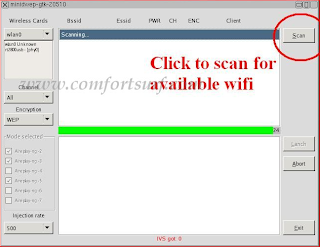
5. Now Minipwep-gtk  program will open. Click Scan.

If you are living nearby someones WiFi hotspot and every time your laptop search for conne How to Hack WEP/WPA/WPA2 Wi-Fi Password

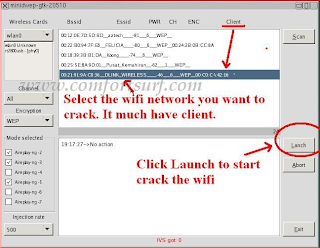
6. Select a wireless network(should have Clint) from the list. And click Lunch to start creaking process.

If you are living nearby someones WiFi hotspot and every time your laptop search for conne How to Hack WEP/WPA/WPA2 Wi-Fi Password

7. Sometimes its take a while according to your victim connections IVS value and password strength. So keep passions.

If you are living nearby someones WiFi hotspot and every time your laptop search for conne How to Hack WEP/WPA/WPA2 Wi-Fi Password

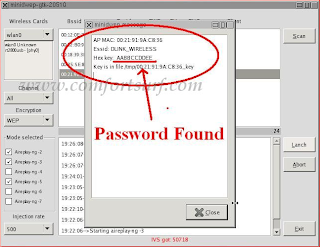
8. If it found a password, it should appear like this.

If you are living nearby someones WiFi hotspot and every time your laptop search for conne How to Hack WEP/WPA/WPA2 Wi-Fi Password


To creak WPA/WPA2 follow this image instruction.

If you are living nearby someones WiFi hotspot and every time your laptop search for conne How to Hack WEP/WPA/WPA2 Wi-Fi Password

Let me know if you have done it successfully or you have any complicity.

      Click here for Unetbootin.rar (4.91 Mb)

Click Here Download beini.iso - (49.61Mb)

Best Method To Crawl Websites


Hi all , today i will advice you the best software to crawl websites it's not popular but it's the best one i think coded by my friend r3dm0v3 from Iran Enjoy !


Mauritania Attacker.

Top 10 Best Android Apps For Hackers And Penetration Testers


Android is among the the best mobile operating systems now a days, There are a big number of mobile phones using android as their operating system. Within few time, Android got good reputation in market and a big number of users as well, There is no doubt that android is a best operating system and based on linux. Well there are a lot of hacks and tricks in android operating system and many people don't know about them, Today I'm going to post some best tools for hackers, Penetration testers and for security professionals I hope you'll like them.

Top 10 Best Android Apps for Hackers

FaceNiff -- 


FaceNiff is an andriod App which allows users to hijack sessions over the wi-fi in your network, This is a kinda Firesheep for andriod, If you are a pentester or if you know what is session hijacking then this tool is just easy for you to use.
 Through faceNiff we can hijack other people profiles easily, Through this App you can hijack these profiles : 
FaceBook , Twitter, Youtube, Amazon, VKontakte. Tumblr, MySpace, Tuenti, MeinVZ/StudiVZ, blogger, Nasza-Klasa

Network Mapper -- 


Network mapper is one another android used to find devices in your network and scan them, You can easily export scan report of your network and send it to your Gmail account via network mapper. Its used to find SMB servers, FTP servers and SHH servers in your network and help you to diagnose them.

Wifi Kill --


Wifi Kill is a miscellaneous android App, Using Wi-fi Kill you can easily kick out anyone from your network, YES! If someone is using the same internet connection with you (shared or Wi-fi) now you can just through them out of the network. 

Router Bruteforce ADS 2 -- 


If your android cellphone is connected with a wi-fi network and you want to access its router then router bruteforce ADS 2 is here for you. This app has some default passwords for every router and it checks all passwords on the router one by one. There are a lot of chances to get access of router but as it is bruteforce attack so sometime it also fails :p . 

Router Keygen --


When I go outside, My android device detects a lot of wi fi networks but they are secured with password, But now I can crack there passwords/keys easily with Router keygen android app, YES! you can also! This is a kind of bruteforce attack to the wi-fi  network.  

DriodSheep -- 


Driod sheep is just another session hijacker like Facesniff, This is the most popular session hijacker for andriod mobiles, It is also used to captuer Facebook, Yahoo, Youtube and other profiles. 

Net Swiss Tool Free --

Net swiss tool scans devices in your network, check open ports and perform a lot of things in your network like ping, trace, ARP, UDP flood etc. 

KWS Android Web Server -- 

KWS android web server is one another android app for testing webpages and websites inside your smartphone, This app is also useful for web developers, web designers and coders for testing and debugging their developed websites.

Wi-Fi Analytics --

Wi-fi analytics is a android app used to find SSIDs, Mac Adress and signal strengths of your wi-fi connection and keeps you up to date with a desktop widget.

Anti - Andriod network Toolkit --

Anti is a best and my favorite one hacking tool for android users, YES! This app is best of all android apps for penetration testers and hackers,This app can hack any local computer in your network by finding their IP, scanning it and by finding vulnerabilities in computer, you can see images and you can easily spy on them via ANTI. 

What Is Iis Exploit And Iis Exploit ?


For Windows 7


1) Go to My computer >> Right Click >> Select “Add a Network Location” .

2) Click on “Next” >> Choose the first option in the next screen >> Click “Next “.

3) Now enter the URL of the Vulnerable Site and Click on “Next” .

4) Now you will see a folder with name of that site, Open that folder and upload that file.
The link to your defaced page will be like “”http://vulnerablesite.net/mypage.html””
where mypage.html is the defaced page i uploaded.

Vulnerable Sites For Practice: 
http://pastebin.com

We Take No responsibility for any sort of loss/harm caused due to information provided here. We prohibits the illegal use of the info. This tutorial is for educational purpose only !

Note: This tutorial is only for Educational Purposes, I did not take any responsibility of any misuse, you will be solely responsible for any misuse that you do. Hacking email accounts is criminal activity and is punishable under cyber crime and you may get upto 40 years of imprisonment, if got caught in doing so. 

Exploit Plugins


The core of SAINTexploit is its many vulnerability exploits. Each exploit and all related information is stored in a separate plug-in file, making it easy to add or remove exploits. The plug-in files have a file name ending in .sx and are located in the exploits directory.

Each plug-in file contains general information about the exploit, tutorial information about the vulnerability, a definition of the input parameters, conditions under which to run the exploit, the type of shell spawned by the payload, and the exploit code itself. These are discussed in the following sections.

General Information ?

Each exploit plug-in begins by defining some general information about the vulnerability. For instance:

name = "Microsoft IIS 5.0 printer ISAPI extension buffer overflow"; id = "iis_printer_isapi"; date = "20060208"; cve = "CVE-2001-0241"; bid = "2674"; osvdb = "3323"; saint_id = "web_server_iis_iis,web_server_iis_iisx"

The name is the name of the exploit, which is also the text which the user sees in the data analysis pages. The id corresponds to the file name of the plug-in, minus the .sx extension. The date is the date on which the exploit was added, in YYYYMMDD format.

cve is the CVE entry for the vulnerability. bid is the SecurityFocus Bugtraq ID of the vulnerability. osvdb is the Open Source Vulnerability Database entry for the vulnerability.

saint_id is the vulnerability check ID which is used to check for the same vulnerability in SAINT. All SAINT vulnerability check IDs can be found in the vulns.dat file.

Tutorial Information ?

The next section of the exploit plug-in is the tutorial information. This section contains the information which the user sees when clicking on the exploit name under the Exploits tab or on the data analysis screens.

The tutorial information is divided into five sections: Background, Problem, Resolution, References, and Limitations. Each section is enclosed in braces. For instance:
problem { The ISAPI extension which handles requests for file names ending in <tt><b>.printer</b></tt> is affected by a buffer overflow which could allow remote attackers to execute arbitrary commands. }
 
Notice that the tutorial information is written in HTML format. The only exception is the References section, which is simply a list of URLs. The URLs are shown as hyperlinks when viewed by the user.

Some client exploits have a sixth section, Instructions, which contains the body of the e-mail message which is sent out to prompt users to follow the exploit link. This section is plain text, except for the keyword %url% which stands for the link to the exploit. If the Instructions section is absent, then the e-mail message is a default string.

Type and Class ?

The next section of the exploit plug-in specifies the exploit type and class. For instance:


type = "remote"; class = "web";

The type tells SAINTexploit how to run the exploit. The exploit type can be one of three strings. remote indicates that the exploit targets a service running on a remote host. local indicates that the exploit only runs after access to the sasaran has been gained using a remote exploit or some other means. Local exploits usually result in privilege elevation if successful. client indicates that the exploit targets a vulnerability in an application which is initiated by a user. Client exploits use an exploit server to deliver the exploit to clients. tool indicates that the exploit does not attempt to penetrate the target, but instead performs some information gathering function.

The class groups exploits together based on similar application types or attack vectors. It can have one of eight different values: web, mail, ftp, rpc, passwords, browsers, windows_os, and other.

Parameters ?

The parameters setting is a variable list corresponding to the arguments which are passed to the exploit plug-in when executed. For example:


parameters = ($port, $os, $shellport, $thisaddr, $target);

In this case, $port is the TCP port number of the remote service, $os is the platform type corresponding to one of the indices in the conditions, $shellport is the port used for remote access (see Shell Ports), $thisaddr is the address of the machine running SAINTexploit for the purpose of connecting back with a shell, and $target is the address of the sasaran machine.

The parameter list corresponds to the fields which the user fills in when running the exploit individually. When running an automated penetration test, the values are automatically set by the SAINTexploit engine based on available information.

Conditions ?

Each exploit specifies a set of conditions which determine the circumstances under which the exploit should be attempted. The SAINTexploit engine automatically takes these conditions into account

when deciding which exploits to run. For example:

platform[0] = "Windows 2000"; platform[1] = "Windows XP"; default_port = "80/tcp"; condition = "Microsoft-IIS/5\.0";
 
In the above example, the exploit runs against Windows 2000 and Windows XP. The number in the brackets is the index which corresponds to the $os input parameter. (See parameters.) 80/TCP is the default port when running the exploit individually and the port which triggers the exploit during automatic penetration tests. The string Microsoft-IIS/5.0, if found in the received data during a port scan, also causes the exploit to run, enabling exploitation on non-standard HTTP ports. Note that the dot is escaped by a backslash because the string is a PERL-compatible regular expression, in which the dot character alone would have special meaning.

In some cases, it is useful for the condition to have an index as well. For example:

platform[0] = "Windows 2000"; platform[1] = "Windows XP"; default_port = "80/tcp"; condition[0] = "Microsoft-IIS/5\.0";
condition[1] = "Microsoft-IIS/5\.1";
 
In this case, rather than just triggering the exploit, the conditions also specify the $os setting when running the exploit. This exploit would be run with $os equal to 0 against Windows 2000 servers running IIS 5.0, and $os equal to 1 against Windows XP running IIS 5.1.

It is also possible to specify the exploit's order within the execution sequence of an automated penetration test. For example:


order = 4;

This line tells the exploit to run after any exploits with an order of 1, 2, or 3, but before any exploits with an order of 5. Controlling the order of execution is useful for ensuring that exploits with a higher potential to cause crashes run after those with a lower potential to cause crashes, to avoid false negatives. Exploits which are not known to cause crashes typically have an order of 1. Exploits which may cause a service to crash typically have an order of 3 or 4. Exploits which could cause the whole system to crash typically have an order of 5. The default order is 3.

Shell Type ?

The payloads of the exploits vary in the way they allow remote access after successful exploitation. The shell setting tells SAINTexploit which method the exploit uses, so that it can properly set up the connection. For example:
shell = "reverse port";
 
There are several possible values for this setting:

  • interactive: an interactive command shell runs in the same socket as the exploit

  • port: the exploit runs a command shell on the TCP port specified by the $shellport parameter

  • port n: the exploit runs a command shell on TCP port n

  • reverse port: a command shell connects back to SAINTexploit on the TCP port specified by the $shellport parameter

  • reverse port n: a command shell connects back to SAINTexploit on TCP port n

  • select port: same as reverse port if $shelltype para

  • direct: a command is sent as an argument to the exploit

  • meter is 0 or port if $shelltype parameter is 1

  • none: the exploit does not open a command shell
 Regardless of the type of shell, SAINTexploit will take the necessary steps to create the connection and transmit commands on behalf of the user. All of the above shell types appear the same under the Connections tab and behave similarly from the user's point of view.

Exploit Code ?

The last section of the exploit plug-in is the exploit code. This is the exploit aktivitas itself. The start of the exploit code is marked by the word exploit followed by an open brace. The end is marked by a close brace. The code is written in SAINTexploit's own exploit programming language, which is syntactically similar to PERL but with some additional functions.

To add exploits written in a different programming language, simply have the code within the plug-in call the code in a separate file. For example, if you want to have SAINTexploit call a Python program, create a SAINTexploit plug-in and put the following code into the plug-in:

    exploit {
        exec("exploits/myexploit.py", @ARGV);
    }

Where "exploits/myexploit.py" is the location of the external program. Make sure that the external aktivitas handles the input parameters specified in the plug-in's parameter list.

Search

Blog Archive